Where It’s At: Basic Digital Mapping for Your Class

This week’s Digital Pedagogy workshop, “Where It’s At: Basic Digital Maps for Your Class,” will occur Tuesday, October 13, from 4:30–5:30 pm, with a repeat on Wednesday, October 14, from 11:00 am–noon. The location is the library computer lab (Abell 208).
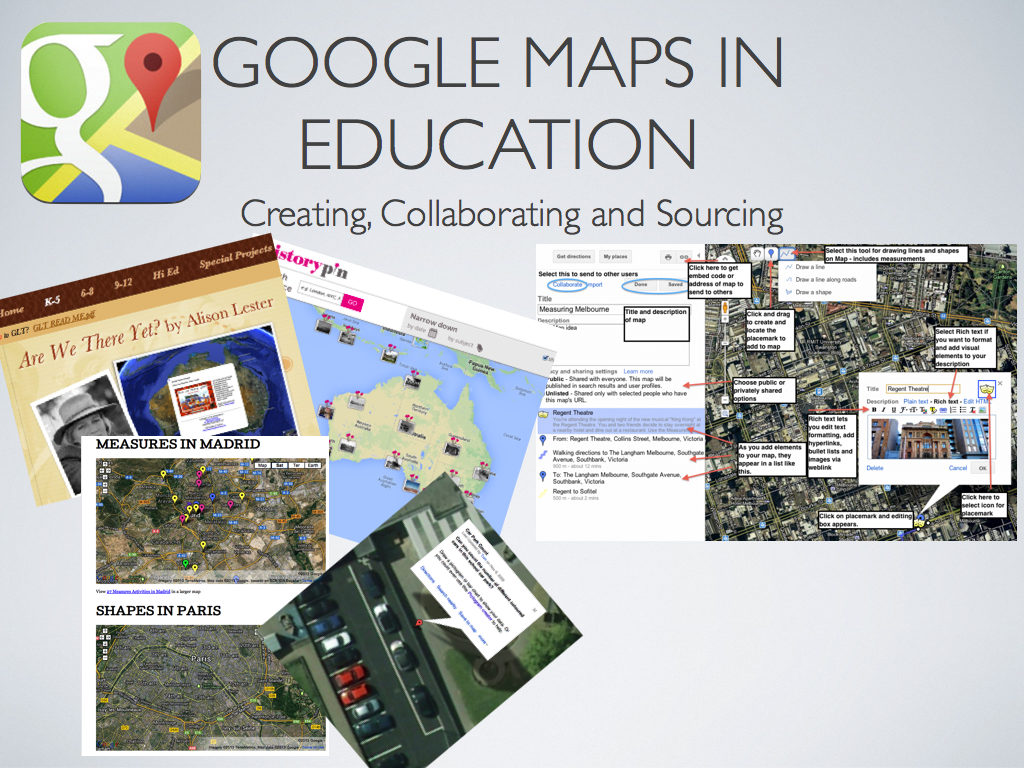
Google-maps-in-education.001-001-2lr147f

Most of us are used to getting driving directions and other geographical information from digital applications on our devices. But you may not have thought as much about how mapping projects can be effective elements of teaching and learning. Now, sometimes we use the term “map” in a broader sense to refer to any representation of content in graphical form; thus there are “mind maps” and “concept maps,” for example. But in the more specific sense, maps are used to present data and information that can be connected to spatial coordinates of latitude and longitude. Across the curriculum there are many possibilities for visualizing content with maps, bringing about deeper insights and more effective learning in the subject matter.

The term “Geographical Information Systems” (GIS) refers to the category of applications and practices involved in mapping projects. These projects, and the associated tools needed to produce them, range widely in complexity. The most commonly used professional GIS tool is ArcGIS, which is installed on computers in a number of workstation areas here at Austin College, including the library and the Idea Center. One of our Mellon grant recipients, political science professor Don Rodgers, is leading a project that utilizes ArcGIS in the Social Entrepreneurship for Poverty Alleviation (SEPA) initiative, a collaborative venture between Austin College and the Texoma Council of Governments.

While ArcGIS is the current standard for GIS software, its use involves a significant level of training and cost. Fortunately, there are more accessible resources at hand if you are interested in incorporating mapping projects and assignments in your courses. For starters, there’s Google Maps (and Google Earth), which is more than just a navigational app on your phone. As Adeline Koh recently observed in an article on digital pedagogy,

Starting with Google Maps to integrate digital humanities [and other liberal arts] in the classroom is relatively painless, easy and free. The tool is easy to navigate, and as many students are already familiar with the Google interface, this familiarity helps them to get to the meat of the assignment more quickly. Instructors interested in exploring mapping projects should thus probably start with this tool. While much more sophisticated projects involving GIS and visualization software are possible, they require considerably more investment in terms of course time and resources.

Another application that is free to use and worth considering is Story Maps, created by ESRI, the same company behind ArcGIS. Story Maps offers a wide range of attractive mapping features; for an extensive gallery of projects created with Story Maps, peruse their gallery of showcase projects, organized by topic.

Both Google Maps and Story Maps allow you to embed narrative text, images, and mulitmedia content into a mapping platform in order to create rich spatial visualizations of your material. The projects can be created collaboratively, thus giving rise to the practice of “social mapping.” For one interesting example of an ongoing collaborative social mapping enterprise, check out some of the projects at Historypin.org.

At this week’s session, we’ll brainstorm ideas for incorporating mapping projects in your class and work together on a simple project that will demonstrate how you can use some of these basic mapping tools. Looking forward to seeing you there.

Curated Resources

Digital Publishing With Scalar

scalar-logoThis week’s Digital Pedagogy workshop, “Digital Publishing with Scalar,” will occur Tuesday, October 6, from 4:30–5:30 pm, with a repeat on Wednesday, October 7, from 11:00 am–noon. The location is the library computer lab (Abell 208).

This week we explore Scalar, a new web-based digital publishing platform. Several instructors here at AC are experimenting with Scalar this semester, including Nate Bigelow and Mike Fairley in their CI classes, Ivette Vargas-O’Bryan in Introduction to Buddhism, and Dave Griffith in an upper–level marketing course. Like WordPress, Scalar is a free open-source application that is server-based and that facilitates the creation of multimedia content and projects on the web. While there are significant similarities between the two, Scalar is particularly suited for the production of free-standing long-form projects that incorporate large amounts of rich media (images, video, audio, maps, timelines, etc.) within the format of a “book,” though a book reconceived in a native-digital format. As the trailer below states, Scalar projects might be thought of as a cross between an e-book and a website:


Among the features highlighted by early users of Scalar are the following:

  • Well-suited for group assignments, in which students work together to produce a single, collaborative deliverable. All versions of a project are preserved, and every user contribution is tracked.
  • Incorporates full commenting and annotation functionality on all forms of media
  • Operates with a “flattened hierarchy,” in which all forms of content (pages, media, comments, annotations, tags, paths) have an equal status and can be interrelated in structures designed by the author.
  • Allows a variety of page layouts and customizable styling options
  • Full control of project accessibility, from private to restricted to fully public.
  • There are agreements with several major digital archives (the Internet Archive, Critical Commons, the Metropolitan Museum of Art, and others) that allow Scalar to easily incorporate digitized materials into projects with full permission for fair use.
  • Material may also be easily imported from other Internet repositories and file storage sites such as YouTube, Vimeo, and SoundCloud, as well as local sources.

You can see some examples of Scalar projects at this showcase gallery. While none of the projects at Austin College are in public mode yet, you can begin to experiment with Scalar if you wish by creating an account at scalar.acdigitialpedagogy.org. Come to the workshop, and we’ll walk through some of the basics together.

Curated Resources

Incorporating Student Blogging in Your Course

This week’s Digital Pedagogy workshop, “Incorporating Student Blogging in Your Course,” will occur Tuesday, September 29, from 4:30–5:30 pm, with a repeat on Wednesday, September 30 from 11:00 am–noon. The location is the library computer lab (Abell 208).

Is blogging really “key to the future of higher ed?” Even if you’re not prepared to go quite that far, you might see some value in helping students to write and work in a space on the web that facilitates peer interaction and the possibility of a broader and more authentic audience. The rationale for faculty blogging discussed in the previous post applies just as well to students…maybe even more so. As the college explores strategies to enhance student writing and digital communication skills, the encouragement of student blogging at Austin College could help create a wider and more visible culture of writing in our academic community.

I am aware of at least two AC faculty members who currently  include student blogging among course activities. Brett Boessen (media studies) has done so for a number of years; for example, see this description of blog assignments in his recent course, “Elements of Media Making.” And in “Student Blogging in PSYCH 101,” Ian MacFarlane reflects on his adoption of student blogging in that course:

Students are required to make an introductory post, which provides some background about themselves and their interests regarding the class, and to post a comment on a classmate’s blog. Over the remainder of the semester, students are responsible for posting seven more times on their own blog and seven more comments on their classmates’ blogs. Every Monday, I post two prompts related to the content we either have just covered or will cover the coming week (for an example see here; for the complete series of prompts, see here), so there are always options for students.

Ian considers the practice “moderately successful” so far and notes, “While I continue to work on ways to get students to be more engaged with each other, I’m also working on generating traffic to their blogs from people outside of the class to provide students a wider forum to discuss their ideas.”

The chance to give students “a wider forum to discuss their ideas” strikes me as a really worthwhile goal. Derek Bruff, mathematics instructor and director of the center for teaching excellence at Vanderbilt, gives a compelling account of the value of publishing student writing on a course blog:

Last fall , for my first-year writing seminar on the history and mathematics of cryptography, I posted my students’ expository-writing essays on our course blog. The assignment had asked students to describe a particular code or cipher that we had not already discussed—how it came to be, how it works, how to crack it, who used it. They described more than a dozen codes and ciphers. It seemed a shame that I might be the only one to read such interesting content, so I asked the students to read and comment on two papers of their peers. The course blog provided an ideal platform for that task.

About a week later, one of my students arrived at class excited. He had Googled his paper’s topic (the “Great Paris Cipher”) and saw that his paper was the third result listed. He said, with a little trepidation, “Some high-school student is going to cite my paper!” Another student asked if I had seen the lengthy comment left on his blog post by a cryptography researcher he had cited. “That’s pretty cool that the guy in my footnotes read my paper,” he said….

Developing a successful course blogging practice requires a willingness to experiment with, reflect upon, and revise one’s course design. Mark Sample, director of the digital studies program at Davidson College, has been chronicling his ongoing pedagogical experience with student blogs and public writing at the ProfHacker blog, and describes a threefold framework for thinking about blogging assignments in terms of the overall structure of the blog, the rhythm of postings, and the use of different student roles.

I’ve tried two overall structures:

A hub-and-spoke model, in which every student sets up his or her own blog, and I aggregate their postings on the main class blog.

A centralized class blog, in which all the students have accounts on the same blog, and their posts and comments all show up in the same place.

I’ve experimented with different rhythms:

The free-for-all model, in which students simply must post 10 (or some other number) of blog posts by the end of the semester.

The checkpoint model, in which students must post a specified number of posts by particular checkpoints spread throughout the semester.

The weekly model, in which all students (or, if using roles, a subset of students) must post every week.

Finally, I’ve increasingly relied on assigned roles, so that not every student is posting at the same time, and furthermore, so that each group of students has a specific task for that week. For example, most recently I divided a class of 25 students into four groups, rotating week-to-week from one role to the next:

first readers–these students are responsible for posting initial questions and insights about the day’s material to the class blog the day before class meets.

respondents–students in this group build upon, disagree with, or clarify the first readers’ posts by the next class meeting.

searchers–students in this group find and share at least one relevant online resource. In addition to linking to the resource, the searchers provide a short evaluation of the resource, highlighting what makes it worthwhile, unusual, or, if appropriate, problematic.

the fourth group has the week off in terms of blogging.

As you can see, there are many possibilities and approaches to incorporating student blogging in your course. So join us for more conversation and demonstration at this week’s workshop.

Curated Resources:

Got Blog? Getting Started with WordPress

wp1This week’s Digital Pedagogy workshop, “Got Blog? Getting Started with WordPress,” will occur Tuesday, September 22, from 4:30–5:30 pm, with a repeat on Wednesday, September 23 from 11:00 am–noon. The location is the library computer lab (Abell 208).

We all know what a blog is, right? You’re reading one now. Have you thought about starting a blog of your own, but aren’t quite sure where to begin? Come join us for some conversation and demonstration this week about academic blogging and the WordPress platform.

We’ll talk about the nuts and bolts of getting up and running on WordPress, but that’s the easy part of the equation. What requires more thought and consideration is answering the questions, “Why blog?” “What is my purpose?” What are my objectives?” “Who is the audience?” “Do I have something to say?” There are at least a dozen or so colleagues here at Austin College who blog or have blogged with some degree of frequency. And no doubt you read blogs from people in your field and beyond. So one learns by observing that blogging can take many forms and serve diverse purposes. Still, only you can determine whether and how blogging and other forms of online digital academic activity will fit into your larger set of practices for research, teaching, and learning.

I do think that establishing a significant scholarly presence on the open web can be a game-changer for an academic. Traditionally, scholarly work only became public through, well, “publication,” that is, the dissemination of the finished product of a process of investigation, research, and reflection. But now that the process of knowledge production can take place in an open and connected environment, we are more and more discovering the benefits of thinking and writing “out loud” and of “open peer review.” Blogging can be one vehicle by which we make our thinking visible to ourselves and others, not as a finished product, but as something that is still and always probing and provisional, searching and reaching toward greater clarity, insight, and comprehension. By opening our thought to public dialogue and conversation, we create the very conditions by which our ideas can be refined, our understanding deepened, and our expression made more eloquent.

In his post “Who is this for?,” Gardner Campbell (@GardnerCampbell), professor of English and vice provost for learning innovation at Virginia Commonwealth University, reflects on blogging as part of the practice of “observable work“:

I began blogging by understanding that this was my blog, so it was for me, but the work I do for me has the potential to be of interest to others as well. I knew that without being able to explain it, largely because my experience of reading other bloggers had made that impression on me. This is his blog, or her blog, and they write out of their own experience, narrating their work, wondering aloud, bringing things to light the way a good late-night conversation will….

[F]or a scholar to commit to trying to work things out for himself or herself in public in this way can be very daunting. My longing for connection finally overcame my fear of humiliation, though that’s a constant struggle. More to the point, I discovered very quickly that working things out for myself in this way, with the fresh provisionality of the thinking still clinging to the thoughts, had the magical property of bringing other people who were doing the same thing into a distributed conversation that took on a life of its own far beyond anything I could have imagined.

I don’t try to work everything out here. I recognize the difference between personal and private, and I need that difference to exist. But to a greater extent than I had ever dreamed, working things out for myself with a questing, probing, sometimes halting voice brought me to a community where collegial inquiry and most of all connected learning became the norm, not the exception. Something like what I’d always thought a university could be.

Blogging can be part of a broader approach to academic work known as “open notebook scholarship.” Historian Caleb McDaniel (@wcaleb) asks, “What would happen if scholars worked to make every part of their research process more public, not only at the point of final publication, but at every point along the way?” In his blog post, “Open Notebook History,” McDaniel explains his rationale for conducting research on open platforms:

Open-source blogging platforms, curation tools, bibliographic software, and micro-blogging platforms enable historians to easily share information about our research as it happens. As Chad Black noted a few years ago, “we now have the possibility to construct and curate our research materials and process archives, what I call … the ‘Papers of You,’ in real time, and make it immediately available to those without the resources to gain access to our eclectic collections.”

The advantages of such a practice have already been well-articulated by the proponents of something called Open Notebook Science, a movement that recently received positive attention in the prominent journal Nature. Open Notebook Science (ONS) is the practice of putting one’s entire lab notebook online, so that other researchers have access not just to a scientist’s publications, but to the underlying data, methods, and experimental results that drive research projects forward.

These are just a few ideas to get you thinking about how blogging might fit into your professional practice. Join us this week to follow up and learn more.

Curated resources:

Using Social Media in Teaching and Learning

journal.pcbi.1003789.g001This week’s Digital Pedagogy workshop, “Using Social Media in Teaching and Learning,” will occur Tuesday, September 15, from 4:30–5:30 pm, with a repeat on Wednesday, September 16 from 11:00 am–noon. The location is the library computer lab (Abell 208).

Following up on last week’s introduction to Twitter for academics, this week we’ll explore how to use Twitter and other social media with students. Over the last several years, instructors have been very inventive in experimenting with Twitter to enhance pedagogy. Here are several possible use cases:

Create a “backchannel” for the class. This gives students and you another avenue of communication that can be much more dynamic and rich than, say, a Moodle discussion forum or an email distribution list. A backchannel can function both during class meetings and, especially, outside of class time. Give your course a unique hashtag and ask students to include that hashtag in every course-related post or tweet. Students then have a convenient channel to take notes, make comments, ask questions, share resource links and suggestions, and respond to one another with help. Collaborations could be established with other sections of the course, with other courses on campus, and beyond the college. You could connect the course to outside experts and other persons beyond the class who could enrich student learning.

If you are particularly bold, you could even have this activity taking place during class, letting students “live-tweet” class lectures and presentations, just as commonly occurs at academic conferences. While you might think this would be distracting, it could also be an interesting form of public note-taking and active listening, not all that different from taking notes with pen and paper. It could be very helpful to see, for example, what students take away from a presentation to post on Twitter and how conversations about the subject continue after class. Derek Bruff (@derekbruff) offers a helpful overview of possibilities in “Backchannel in Education–Nine Uses.”

Have students post observations and photos/videos from field or external locations. Many courses have occasions in which students are outside the classroom, performing field observations, visiting museums or galleries, attending events, documenting local activities, etc. And of course students are out and about on their own time as well. Create the opportunity for them to capture course-related information and share it with the entire class.

Margaret Rubega (@ProfRubega) teaches ecology and evolutionary biology at the University of Connecticut and has employed Twitter as a learning and communication tool in her ornithology class. She asks students to post tweets when they observe birds and bird behavior, noting their location and connecting their observations to course material. Students used the hashtag #birdclass, which others outside the class can also access and contribute to (check it out). Her course activity was featured in local media (“Bird Class Tweets Sightings“) and in the New York Times (“On Birds, Twitter, and Teaching“). An interview with Dr. Rubega notes,

“I wanted students to notice birds more. The assignment succeeded beyond my wildest dreams,” she says. In a lecture class it’s easy to lecture at students without making what you’re lecturing apply to the outside world,” Rubega adds. The Twitter assignment forced students to observe for themselves. And they didn’t limit their observations to campus. They posted about birds beyond the Storrs locale – they tweeted on Spring Break and during weekend trips. Students who gave Rubega the impression that they were not all that interested in birds ended up correcting others on Twitter who were confused about bird species. They wrote about birds on Twitter long after the assignment had ended.

Encourage students to live-tweet events, films, presentations, etc. Instead of having students simply watch media and events (either synchronously or asynchronously), why not have them actively engage by live-tweeting? In “Live-Tweeting Assignments: To Use or Not to Use?“, Adeline Koh (@adelinekoh)

explores some of the benefits and drawbacks to one of my most successful teaching exercises using Twitter—getting students to “live tweet” films. “Live tweeting” basically means tweeting as students are watching the film, either by reporting on or commenting on what they are viewing. I’ve tried this with documentaries, films of famous speakers giving lectures, and feature films. Every single time this activity has massively increased student engagement and learning. You can see a sample assignment I’ve used here and and student reactions to the activity here.

Other possibilities for live-tweeting might include events such as speeches and presidential debates. Imagine having students, say, live-tweet and fact-check this Wednesday night’s Republican presidential debate. They could also analyze the social media strategies of various candidates (so check out…if you dare… @realDonaldTrump, or @BernieSanders).

Use Twitter in foreign language and culture instruction and study abroad. Twitter offers many possibilities for students to practice foreign language communication and learn about world cultures from different perspectives. Students can easily begin to connect with native speakers in the target language and practice sentence composition in real-time chat situations.  Vivian Finch (@vivianfinch) describes her experience using Twitter with her German class:

My first foray into using Twitter with my German students stemmed from an excitement generated from personal use of the micro-blogging site.  I found I could easily plug into a community of individuals that I perhaps didn’t know, but with whom I shared common interests.  It was this community feeling combined with the potential for authentic target language communication that led me to begin using Twitter in my introductory German courses.  The 140 characters gave my introductory level students just enough space to communicate with me, each other, and the world at large in German, and all at their own pace, both outside and inside the classroom.  The students were able to create their own community centered on learning German and learning about German culture, and, to a certain extent, took ownership of their own learning process.

Finch has gone on to even more ambitious activities, as she discusses in “‘Adventures in Twitter Fiction’: Student Generated Digital Storytelling and the Foreign Language Classroom.” In this project students collaboratively and emergently create characters and a storyline to write a Twitter short story in German. A story hashtag pulls all of the tweets into one stream. Students creatively use their German, and also think critically about the short story genre.

There are just a few examples that might help you to start generating some ideas. Of course there are also practical issues to consider, such as how to evaluate and assess Twitter and other social media activities, properly structuring assignments and establishing clear expectations, dealing with possible student resistance, and taking into account possible student concerns regarding privacy and intellectual property. So come and join the conversation this week at the workshop and online.

Curated Resource List

Growing Your Academic Network with Twitter

acdigped twitterOur first digital pedagogy workshop of the semester, “Growing Your Academic Network with Twitter,” will occur Tuesday, September 8, from 4:30–5:30 pm, with a repeat on Wednesday, September 9 from 11:00 am–noon. The location is the library computer lab (Abell 208).

Join us as we explore how you can use Twitter to cultivate your personal learning network (PLN) and to connect with other scholars, ideas, activities, and events in your discipline. This workshop is for everyone–whether you have no experience with Twitter at all, are a sporadic tweeter, or a more regular user who wants to up their game and improve their Twitter experience. You might be curious or frankly skeptical about the whole thing–and that’s ok. Maybe you’ve heard about live-tweeting at professional conferences, and wonder what that’s all about. Even if you don’t know a handle from a hashtag, we’ll get you up and running.

So among other things, we’ll work on:

  • setting up your account and profile
  • the basic elements of a tweet–messages, hashtags, mentions, links, images, etc.
  • tips and ideas on who to follow and how to attract followers
  • Twitter literacy–hashtags, handles, retweets, modified tweets, lists, notifications, etc.
  • using Tweetdeck as a Twitter client
  • how to participate in a live-tweet session
  • how to strengthen your connections and network presence

We’ll draw on the experiences of Twitter users here at Austin College, including the “Tres Hombres” of digital pedagogy (@bolillotejano, @bboessen, and @MorrisPelzel) and other faculty and staff. (You do know that “Tres Hombres” was the title of a 1973 ZZTop album, right? What’s that…who is ZZTop? Nevermind). We’ll also be drawing on some other resources that you can check out here ahead of time. One of the better comprehensive guides for using Twitter in higher education is “The Ultimate Guide to Tweets, Hashtags, and All Things Twitter” by Sue Waters (@suewaters). Regularly updated and highly recommended. In “A Little Bird Told Me: Maximizing Your Learning on Twitter,” Laura Gogia (@googleguacamole) serves up some pithy recommendations and strategies in an attractive infographic. Alison Seaman (@AlisonSeaman), in “Personal Learning Networks: Knowledge Sharing as Democracy,” offers some important conceptual background on PLNs as well as practical suggestions for using Twitter to help build a PLN.

Bonnie Stewart’s (@bonstewart) articles, “In Public: The Shifting Consequences of Twitter Scholarship,” and “Contributions and Connections” explore how the growing use of social media networks by academics is affecting notions of scholarly identity, authority, and influence. She observes that

As more and more academics take to Twitter and other networked platforms to connect and share their work and ideas, a new sphere of influence is opening. And it is beginning to infiltrate academia itself. Twitter is often framed as a more effective way to get fired than hired, but networked scholarly participation can be a powerful site of new contacts and resources and conversations for a scholar, as well as new conventions (hello #hashtags!) and new public audiences for research. Increased citations, media gigs, collaborative research opportunities, invited talks and keynotes, and a variety of other academically-valued material effects can stem from active and sustained networked engagement.

Finally, on a lighter note, Glen Wright (@AcademiaObscura), in “The Weird and Wonderful World of Academic Twitter,” relates some ways in which “Twitter also acts as a virtual water cooler, a place where academics go to build community, have some fun, and let off steam.” So, if you need a bit of humor and distraction on a slow day, you could do worse than check out, say, #RuinADateWithAnAcademicInFiveWords or @NeinQuarterly.

Twitter is also being used in courses and student projects as well…we’ll look more at pedagogical applications of Twitter and other social media in a subsequent workshop.

So please do join us for the workshop if you can. And, of course…follow us at @ACDigPed.

Fall Digital Pedagogy Workshops

Welcome (back) to everyone as we start the Fall 2015 semester at Austin College! Here at Digital Pedagogy@Austin College, we’re looking forward to a new year of activities and projects to support student and faculty learning across the curriculum. In particular we’d like to announce a schedule of weekly digital pedagogy workshops that will be offered this fall. These will be one-hour, hands-on tutorials designed to give faculty ideas and skills to use in the classroom and for professional development. Our plan is to offer each workshop twice a week–once on Tuesday at 4:30 pm, and then again Wednesday at 11:00 am, in Abell Library (probably in Abell 102, but we’ll let you know for sure).

Here’s what we have planned:

  • September 8/9–”Growing Your Academic Network with Twitter”
  • September 15/16–”Using Social Media in Teaching and Learning”
  • September 22/23–”Got Blog? Getting Started with WordPress”
  • September 29/30–”Incorporating Student Blogs in Your Course”
  • October 6/7 –”Digital Publishing with Scalar”
  • October 13/14–”Using Digital Maps in Your Class”
  • October 20/21-”Wikipedia Assignments: What, How, and Why”
  • October 27/28–”Leveraging Student Interests Through Social Bookmarking”
  • November 3/4–”Using Hypothes.is for Collaborative Digital Annotation”
  • November 10/11–”Creating Rich Interactive Timelines with Timeline JS”
  • November 17/18–”Fair Use, Copyright, and Creative Commons Licenses”
  • December 1/2—”Study Abroad with Technology and Media: Tips, Tools, and Apps”

We’ll be blogging about each topic ahead of time to give you further context and resource material. This schedule isn’t carved in stone; if there is particular interest in other topics, we can consider adjustments and/or put those on the schedule for the spring semester. So let us know what you think. Also, if other times prove more feasible, we’re willing to be flexible.

Of course, Mo and Brett are always available for conversation, consultation, and support for your questions and issues of pedagogy and digital technologies. So give us a shout, and follow us here on the blog, in our Facebook group, and on our Twitter feed.

“Reimagining the Liberal Arts in a Digital Age”

ac mag article
The summer 2015 edition of the Austin College Magazine features a cover story on the digital pedagogy initiative here at the college. We’re grateful to Vickie Kirby, Leigh-Ellen Romm, and all those whose hard work contributed to a very fine article. In addition to the main story, there are breakout sections highlighting four faculty projects: Jennifer Johnson-Cooper (Beginning Chinese I); Dan Dominick (Music History II); Ian MacFarlane (Psychology 101); and Andy Carr (Organic Chemistry). I also have an essay that further describes our goal of having faculty and students establish themselves with a professional academic presence and portfolio on the Web (described by Gardner Campbell as a “personal cyberinfrastructure“).

The entire issue is excellent, of course, so do be sure to take it all in!

What Might Digital Wisdom Be and How Could It Help Us?

I’m appreciating Adam Copeland’s piece at Hybrid Pedagogy on “digital wisdom,” which he describes as “a pedagogical approach to technology and the classroom that does not stop at whether or how students may access digital devices in my classroom, but seeks also to address why it is important that students critically engage these very questions.” He offers four “pillars” that he uses in his own considerations of how to craft assignments for his students, each an important reason why he would choose a particular tool, design an assignment in a particular way, or engage students from a particular perspective.

This advice runs parallel to the “not digital pedagogy, just pedagogy” discussion we’ve been seeing lately (e.g.: here, here), in that Copeland’s conception of digital wisdom is a call for us to “move away from easy answers” and move toward pedagogical goals that deepen and expand our students learning.  He links to a range of assignments by himself and others that address his pillars – forming collaborative relationships with peers, preparing for citizenship, encountering difference and disagreement, and welcoming complexity – in concrete but theoretically informed ways, which is a particularly helpful approach for teachers interested in getting started with digital pedagogy.

I would like to push back a little on the way he sets up this helpful discussion, though, because for me, a term like “digital wisdom” can be used even more powerfully than just “the why” of asking students to engage a particular question.  By drawing on the term wisdom, we have an opportunity to activate ancient conversation about the role of practice and the practical – the how – in serving as not only a counterpoint to the why, but also an important aspect of its foundation.  Aristotle called it phronesis, others have used metis, but when we use terms like judgment, prudence and (practical) wisdom, we refer to that process through which we learn from our practices; the how deeply informs and ultimately serves as the foundation for the why. This process, of formulating a why, crafting a concrete how that hopefully enacts that why, and then reflecting on the nature of that enactment and usually making practical changes to the how in light of that reflection, is the very practical and grounded nature of the practical wisdom that pedagogues perform on a regular basis.

Through this process, we come to see ways that the why and the how are intricately linked, and we come to understand both more deeply than dogged application of the why to the how without such process will overlook. Copeland’s argument is crucial to the direction we all must turn in the future, as it recognizes the need to look past the newness and shininess of digital tools to the ways they can help us deepen student learning.  But if we’re not also closing that experiential learning loop ourselves, we’re missing out on significant opportunities to deepen our own learning.  Digital wisdom should be more than the why – it should be the why informed by the constantly developing nature of the relationship between the why and the how.


What Might Digital Wisdom Be and How Could It Help Us?

I’m appreciating Adam Copeland’s piece at Hybrid Pedagogy on “digital wisdom,” which he describes as “a pedagogical approach to technology and the classroom that does not stop at whether or how students may access digital devices in my classroom, but seeks also to address why it is important that students critically engage these very questions.” He offers four “pillars” that he uses in his own considerations of how to craft assignments for his students, each an important reason why he would choose a particular tool, design an assignment in a particular way, or engage students from a particular perspective.

This advice runs parallel to the “not digital pedagogy, just pedagogy” discussion we’ve been seeing lately (e.g.: here, here), in that Copeland’s conception of digital wisdom is a call for us to “move away from easy answers” and move toward pedagogical goals that deepen and expand our students learning.  He links to a range of assignments by himself and others that address his pillars – forming collaborative relationships with peers, preparing for citizenship, encountering difference and disagreement, and welcoming complexity – in concrete but theoretically informed ways, which is a particularly helpful approach for teachers interested in getting started with digital pedagogy.

I would like to push back a little on the way he sets up this helpful discussion, though, because for me, a term like “digital wisdom” can be used even more powerfully than just “the why” of asking students to engage a particular question.  By drawing on the term wisdom, we have an opportunity to activate ancient conversation about the role of practice and the practical – the how – in serving as not only a counterpoint to the why, but also an important aspect of its foundation.  Aristotle called it phronesis, others have used metis, but when we use terms like judgment, prudence and (practical) wisdom, we refer to that process through which we learn from our practices; the how deeply informs and ultimately serves as the foundation for the why. This process, of formulating a why, crafting a concrete how that hopefully enacts that why, and then reflecting on the nature of that enactment and usually making practical changes to the how in light of that reflection, is the very practical and grounded nature of the practical wisdom that pedagogues perform on a regular basis.

Through this process, we come to see ways that the why and the how are intricately linked, and we come to understand both more deeply than dogged application of the why to the how without such process will overlook. Copeland’s argument is crucial to the direction we all must turn in the future, as it recognizes the need to look past the newness and shininess of digital tools to the ways they can help us deepen student learning.  But if we’re not also closing that experiential learning loop ourselves, we’re missing out on significant opportunities to deepen our own learning.  Digital wisdom should be more than the why – it should be the why informed by the constantly developing nature of the relationship between the why and the how.

css.php